Tape 0.4.0 — Personal Private Network, one catalog, the suite we meant to ship
0.4.0 is a major Tape release. Personal Private Network is in every pairing, the library runs from the phone, and several devices share one hub. Full notes below.
0.4.0 is a major Tape release. The version number is the least interesting part. What changed is that Personal Private Network is now in every complete pairing, and that is the piece that lets the rest of the suite behave like one product instead of a desktop archive plus a remote-access side quest.
We wanted an opinionated local listening suite: your folders stay where they are, one catalog, a hub that belongs to you, and a phone that can actually run that library — browse, triage, play — without copying the collection into someone else's app. More than one device on that same catalog, working as clients of one hub. 0.4.0 is the first cut where that shape is the default, not a special setup.
The transport is Personal Private Network (Iroh). It is our name in the product, with Iroh underneath. Pair once. Listen at home on Wi‑Fi. Listen away without installing a VPN app on every device, and without making a public link the only way out. Public links stay optional. Another Tape computer can sit down as a player on the same hub. That is the independence we were after: Tape no longer waits on a third-party mesh to make desk→phone real. Local on the same Wi‑Fi stays free to try. Away-from-home listening is still the licensed layer.
We are glad this one shipped. It is the closest we have come to the Tape we set out to build.
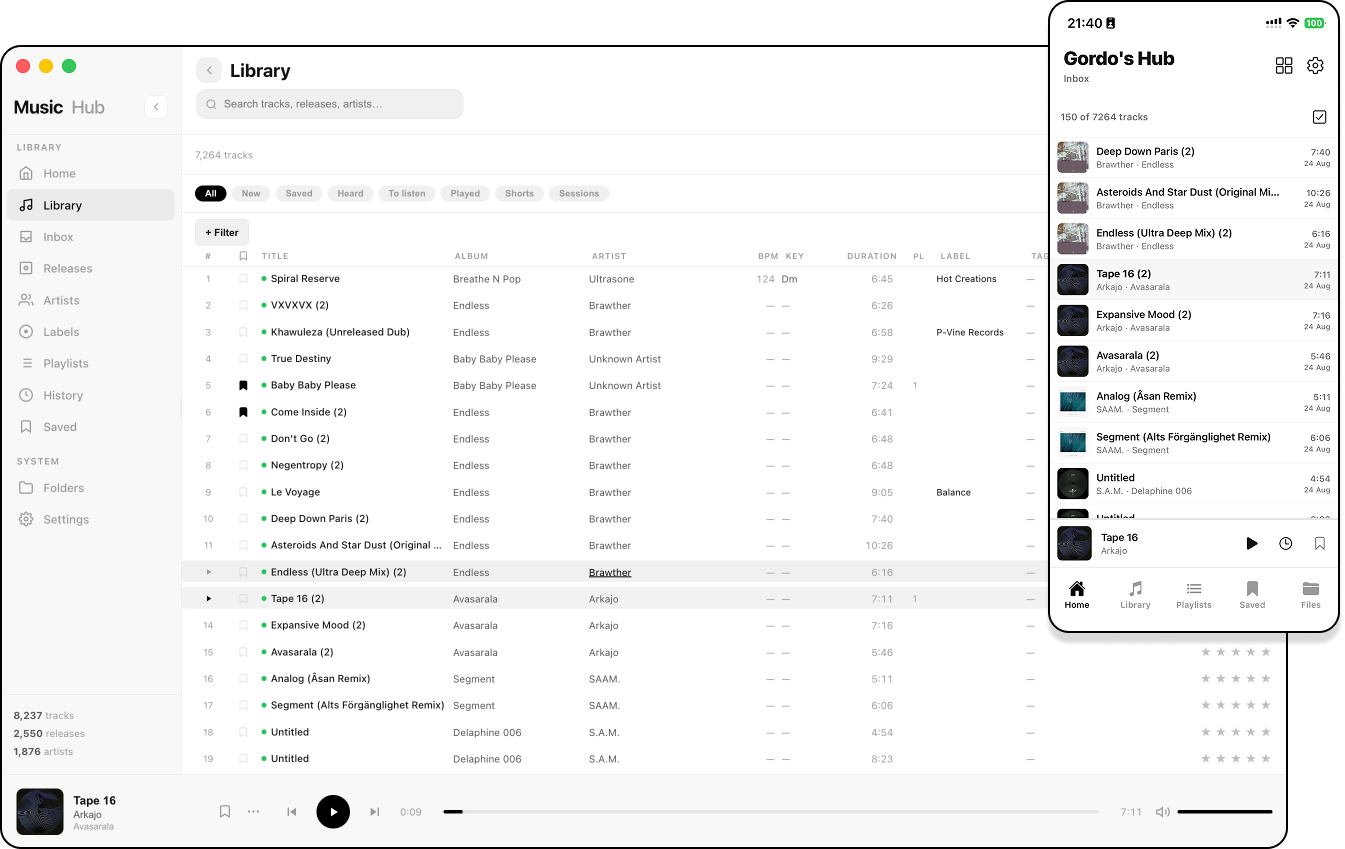
One catalog. Desk hub, phone companion, extra computers as players — same archive.
The other 0.4.0 work only pays off once that connection lives inside the suite: Inbox as new arrivals, playback that starts on tap and holds on 5G, duplicates you can actually solve, ratings, metadata you can correct, playlists that behave on a small screen. The architecture story for the transport is in Iroh inside Tape. The product notes are below, in full.
If you already run 0.4.0, update Desktop and Mobile together. Existing Personal Private Network pairings should come back without pairing again.
What's in 0.4.0
Personal Private Network and connected hubs
- Personal Private Network is now part of every complete pairing — Your hub shares the private connection information needed by Mobile and other Tape computers, so you can listen away from home without depending on a temporary public link.
- Pairing away from home is clearer and safer — QR codes and shared links open the correct hub directly but ask you to enter the temporary code shown by Desktop instead of carrying that code inside the link.
- Use another Tape computer as a player for your main hub — Desktop client mode keeps local and connected libraries separate, lets you browse remote folders and playlists, and shows every currently connected device.
- Public links remain optional alongside the private connection — When a public link is enabled Tape can use it, while disabling it leaves the Personal Private Network available for remote listening.
Playback and streaming quality
- Playback reacts immediately to one tap — Now Playing shows the selected track while the connection and audio are prepared, then starts as soon as the first playable buffer is ready.
- Adaptive streaming prioritizes continuous music — Mobile adjusts its quality range for Wi‑Fi, 5G, LTE and slower connections, and moves to a lower quality before a weak connection can interrupt playback.
- Choose Adaptive, Maximum quality or Low-data mode — Maximum quality can use an original lossless track on Wi‑Fi or LAN, while the lower-data option keeps playback within a more connection-friendly range.
- See what you are actually hearing — Mobile and Desktop client mode show the current format and observed quality when available, without presenting a requested maximum as the live bitrate.
- Playback recovers after network and app changes — Returning from the background, switching networks or rebuilding a suspended private connection keeps the latest track request and avoids sending music through a connection that is no longer active.
Inbox and Library
- Inbox now represents new arrivals instead of the initial library import — The first completed scan establishes the starting library, and music added afterwards appears in Inbox.
- Large Inboxes are no longer capped at 150 tracks — Desktop and Mobile show the real total and load the collection in responsive pages as you work through it.
- Inbox actions match an email-style workflow — Mark heard, Mark to listen and Add to playlist preserve the arrival until you explicitly choose Remove or Clear inbox.
- Advanced Library filters make large collections easier to explore — Combine search with artist, album, label, genre, tags, year, format, BPM, rating, folder, duration and listening-history filters.
- Artwork is more complete across the Library — Album covers, artist photos and label logos appear consistently in lists, details and Saved views when the hub has them.
Duplicates, ratings and metadata
- Duplicate tracks are grouped instead of filling the Library with repeated rows — Track Details shows the underlying files and lets you keep one copy, move extras to Trash and preserve playlist references.
- Personal five-star ratings are available on Desktop and Mobile — Ratings belong to your own hub, can be cleared by selecting the active star again, and can be used as a Library filter.
- Saved tracks stay aligned with system playback controls — Changes made from Mobile, the iOS Lock Screen, Control Center or supported Android media controls update the same Saved state.
- Unknown tracks remain independent — Missing artist or album information stays empty, unrelated unknown files no longer share artwork, and automatic enrichment only writes a result when the match is strong enough.
- Manual metadata editing is more capable and controlled — Search local suggestions, MusicBrainz or Discogs for an artist or album, then review and add matching files from the same folder individually before finishing.
- Writing metadata back to music files is safer — Existing values are preserved when a match is uncertain, reducing the risk of incorrect covers or tags being written across unrelated tracks.
Playlists and everyday controls
- Playlists are faster to manage on smaller screens — Compact rows, Favorite shortcuts, BPM and key, and the redesigned long-press sheet keep common track actions close at hand.
- Playlist artwork selected on Mobile now previews and saves correctly — Cover uploads work through local, public and Personal Private Network connections.
- Shared playlists behave more consistently between hubs — Covers, members, ordering, track actions and the selected streaming quality carry through connected-hub playback.
- Background Library work is easier to control — Database Settings show current processing, allow timed pause and resume, and automatically reduce background work when playback or the computer needs more capacity.
- Now Playing works better across devices — Desktop publishes the active track to system media controls, while the expanded Mobile player keeps quality, Share, Up next and More accessible on short phones.
Upgrade notes
- Update Desktop and Mobile together for the complete 0.4.0 connection, playback, Library, metadata and playlist experience.
- Existing Personal Private Network pairings should reconnect without pairing again.